Assigning a Team, Not Just a Person
Problem
Method allowed one technician per work order, and none unassigned. Real crews need two or three people — or nobody yet. Customers were paying up to 20 hours of custom dev to simulate it.
Challenge
The legacy AssignedTo field couldn't be converted without rewriting every query that touched it, and the platform had no way to run an action per person.
Solution
Built multi-select in parallel with the legacy field, plus Loop Through List — a new platform primitive so every technician gets their own notification.
Outcomes
20 hrs
of custom dev eliminated per customer
30–40%
target adoption within 4–6 months
2
new platform capabilities built
Role
Lead Product Designer
Industry
Field Service
Company
Method CRM
The challenge
Dispatchers couldn't represent work that wasn't yet staffed
The system required exactly one technician and one date on every work order. Field service doesn't work that way.
Dispatchers had built their own ways around it: duplicate work orders, one per technician; sub-work orders for each additional person; placeholder technicians assigned purely so a record would save; unstaffed work tracked in spreadsheets outside the platform. Customizers and partners, meanwhile, were charging for what should have been standard.
This wasn't hypothetical. One customer paid $1,740 in Professional Services trying to work around it — then canceled anyway, citing the same gap: "Wasn't as user friendly as we would have liked, especially since we have multiple techs going to the same job sites." $3,928 in revenue lost, from a customer who had already paid us to solve the problem we'd left in the product.
"I need the ability to assign a Work Order to multiple technicians."
"Inability to assign multiple technicians to a work order."
"Struggled with scheduling and assigning multiple technicians to a work order, as well as reassigning work orders easily."
Three data sources. One problem.
Constraints
What's right and what's buildable.
The trade I made to avoid a migration
I built the new multi-select field in parallel with the legacy AssignedTo field rather than converting it. Converting would have been cleaner. It also would have meant touching every query in the product that reads assignment — in a live system, on a legacy platform, for a release framed as Early. I chose duplication over a migration with an unbounded surface area.
Legacy no-code platform.
No native multi-select existed anywhere. Every interaction pattern had to work within existing component infrastructure or require a deliberate platform investment — which I had to make the case for explicitly.
Existing "AssignedTo" Component
Converting it would have required dropping database constraints and rewriting every query that touched it. The parallel approach kept existing workflows intact while the new model was proven.
Strategic release
shipping as Early Release to control scope before expanding it. Grid support, calendar filters, and custom multi-select fields on other tables were deliberately locked until the core was proven stable.
Turning point
Designing the feature revealed a gap nobody had anticipated
Each technician needed their own notification, not a group email. The platform had no way to run an action per person — not a missing setting, a missing capability.
The easy path was a workaround: hard-code notifications for this one screen, ship the feature, move on. I argued for the other one. Loop Through List became a new action type built into the no-code editor — any action, run once per item in a list, available to anything built on the platform afterward. That required convincing engineering to spend platform time on infrastructure rather than feature time on my feature, and justifying why a one-off would be the more expensive choice over a longer horizon.
That argument is the outcome I'm proudest of on this project. The multi-assignee field solves one problem. The primitive changes what everyone building on the platform can do next.
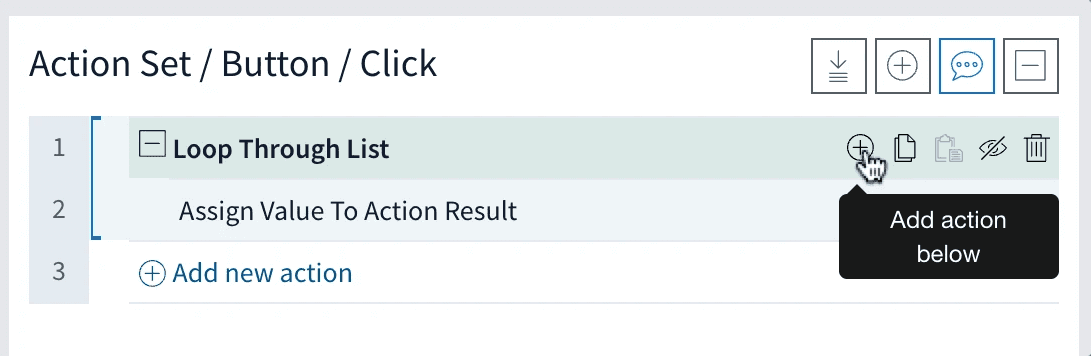
Infrastructure, not a feature. Loop Through List in the no-code editor's action list, with actions nesting inside it — a platform action that didn't exist until this design required it.
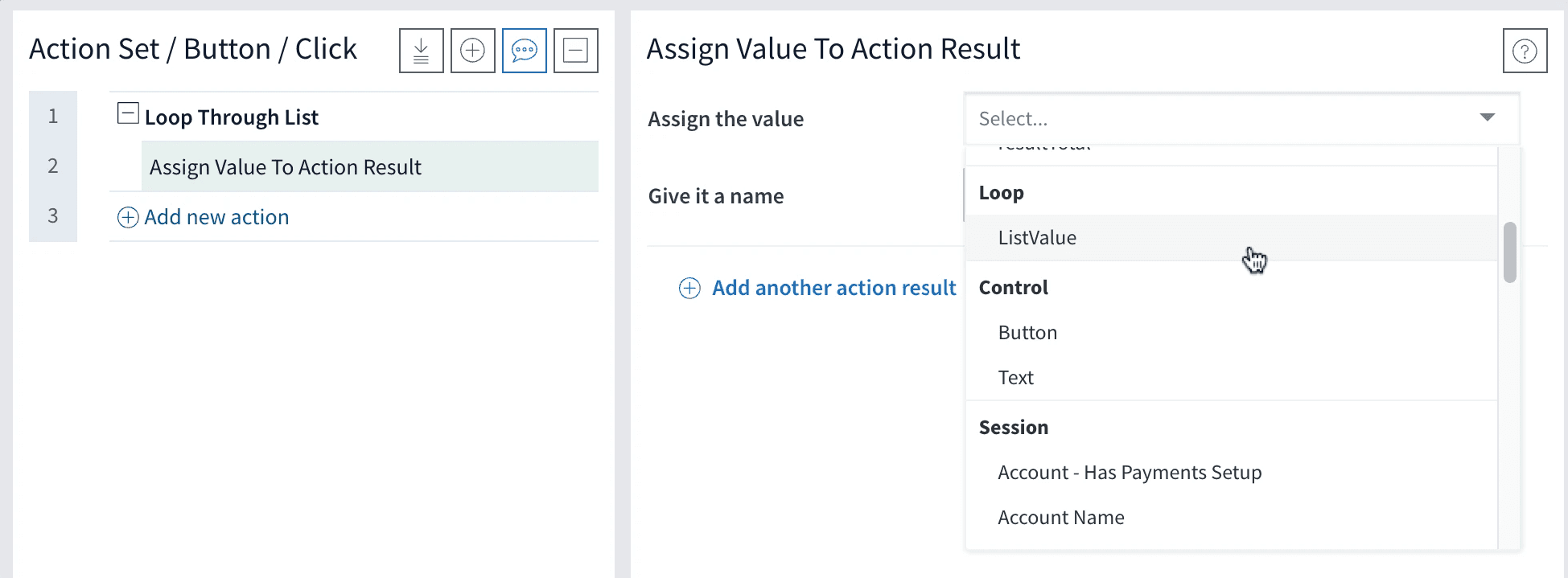
It added a scope, not just a step. Loop now sits in the value picker beside Control and Session, carrying ListValue — so anything inside the loop can read the item it's currently on. That's what turns one group email into a notification per technician.
Design
I pushed the platform forward. Then designed on top of it.
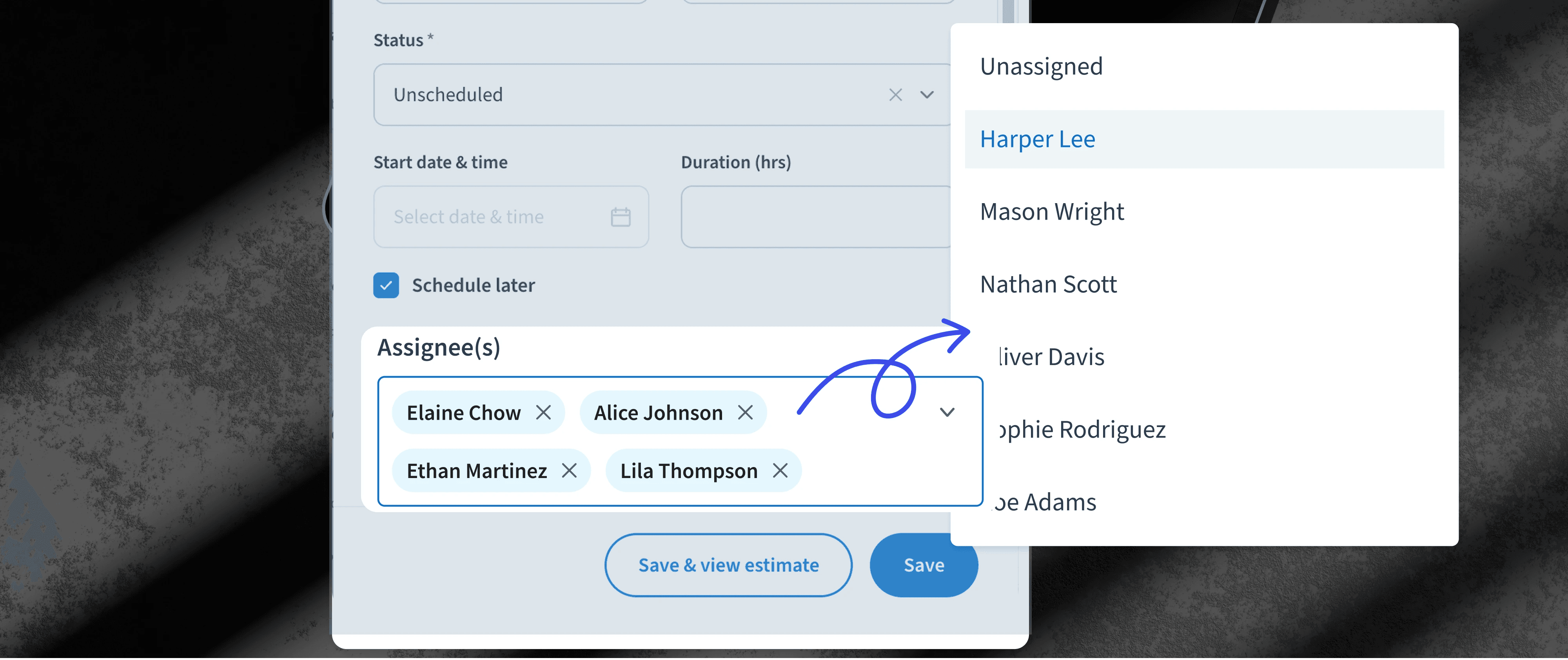
Assigning a team. The interaction scales from one person to several without adding cognitive load — each selection stays visible, removable and immediately readable. Loop Through List fires on save, so every technician gets their own notification.

One field, one to many. Three technicians as individually removable chips. Nothing about the interaction changes between assigning one person and assigning a crew — which is the whole point, since the old model could only ever hold the first case.
Unassigning entirely. Unassigned became a first-class designed state rather than an empty field: visually distinct, readable without a label. "Notify Team" hides when nothing's assigned, so a dispatcher reads job status at a glance instead of interpreting a blank.
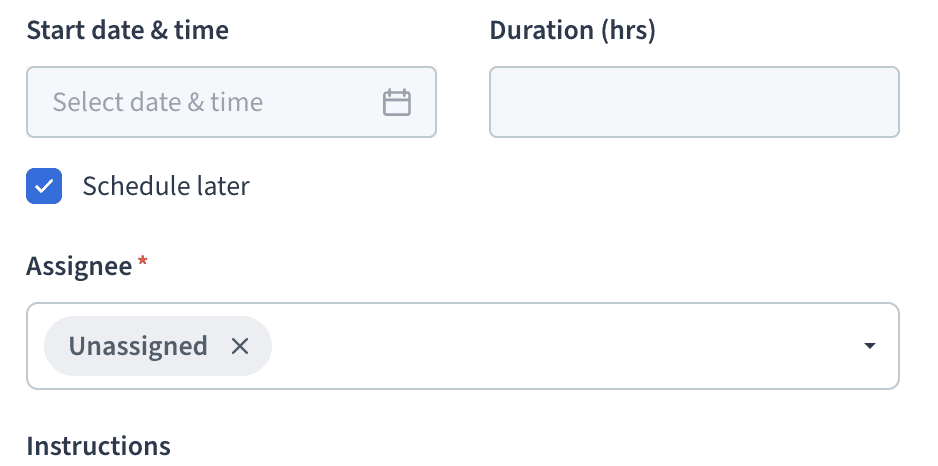
Unassigned is a state, not an absence. A blank field makes a dispatcher guess whether the work is unstaffed or the record is unfinished.
Two fixes straight from testing. Type-ahead, because dispatchers know who they want; continuous selection, because closing after every pick made a crew take three round trips.

Design
Completion wasn't the signal. Behavior was.
Every change below came from watching how they got there, not whether they did.
"I have to keep reopening it every time I pick someone — can't it just stay open?"
→ one continuous interaction
"Can I just type their name? I know who I'm looking for."
→ type-ahead search
Multi-assignee
0%
0%
Satisfaction completion Rate
Number of attempts
0%
0%
Completed on the first try
"Why is it just blank? I'd expect it to say Unassigned so I know it's intentional."
→ The right instinct — an empty field reads as broken, not deliberate. I made the call that setting Unassigned as a true default required broader system changes not in scope for this release. Documented and queued for next iteration.
The hard calls
Decisions that defined what shipped.
Every feature has a version that exists in your head and a version that ships. I chose to be honest about the gap. Early Release framing meant listing limitations in the help centre — not burying them. Dispatchers and partners knew what was stable, what was coming, and that nothing was an oversight.

Crews on the calendar, individuals still findable. Events carry every assigned technician while the rail on the right filters to one person without hiding the jobs where they're part of a team — the case a single-assignee filter silently drops.
The calendar wasn't built for teams — so I designed around it, not through it
Filtering by one technician would miss every job where that person was part of a crew. The problem was behavioral, not visual: dispatchers think in people, not crews. So the calendar shows the team while keeping each individual findable. I validated that against the third-party component's actual limits before committing to it, and designed overflow handling for larger crews rather than discovering the ceiling in production.
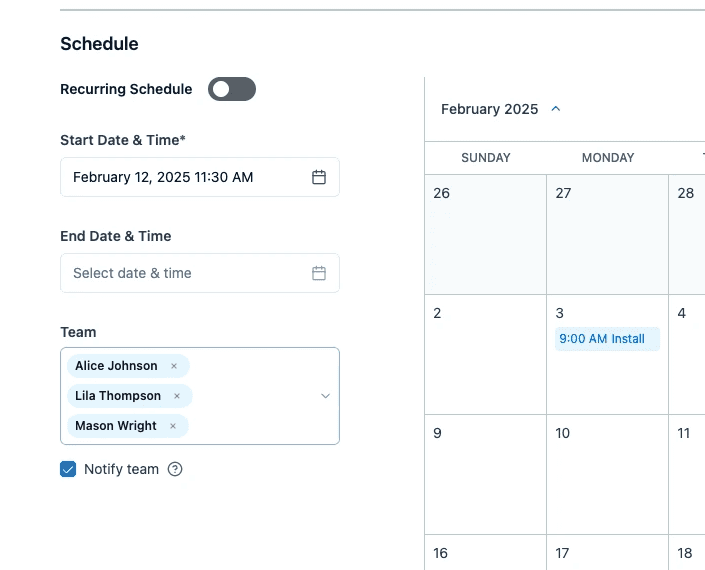
I deferred the "Team" label.
The field was originally named "Team", anticipating a Team Management feature. The infrastructure behind that concept wasn't ready, and shipping the label would have promised a capability that didn't exist. The rename waits until Team Management ships and the word means something.
The outcome
The workaround is gone. The workflow remains.
The duplicate-work-order workaround is replaced by a single record representing the whole team. Unstaffed work can be created immediately and staffed over time. Partner and Professional Services feedback flagged the unassigned state as the single biggest friction point removed from dispatcher onboarding.
Adoption target: 30–40% within 4–6 months — set at that level because this requires dispatchers to change a habit, not just to notice a new option. Availability alone doesn't move behavior.
The component running somewhere it wasn't built for, placed by a customizer without code — the difference between shipping a field and changing what the platform can do.

What's Next
This is just the beginning.
Beyond that: real-time availability filtering, grid support, Team Management, and custom multi-select fields on any table. Each one extends the foundation without rebuilding it.
The next question — what do dispatchers who adopt multi-assignee do differently in their first two weeks compared to those who don't? Finding that moment is what accelerates the adoption curve.
What I learned
The design pushed the platform. That's the standard I'm holding myself to.
Loop Through List was the real outcome, not the multi-assignee field:
Arguing for a platform primitive instead of a one-off gave engineering a clearer target and expanded what everyone can build next. The feature was the occasion; the capability was the result.
Cutting availability filtering was uncomfortable, and right:
A broken-looking interaction erodes trust faster than a feature that isn't there yet.
The "Team" label needed more iteration than it got:
Forward-looking naming should be explicitly scoped and deferred at the start, not shipped and walked back.
Assigning a Team, Not Just a Person
Problem
Method allowed one technician per work order, and none unassigned. Real crews need two or three people — or nobody yet. Customers were paying up to 20 hours of custom dev to simulate it.
Challenge
The legacy AssignedTo field couldn't be converted without rewriting every query that touched it, and the platform had no way to run an action per person.
Solution
Built multi-select in parallel with the legacy field, plus Loop Through List — a new platform primitive so every technician gets their own notification.
Outcomes
20 hrs
of custom dev eliminated per customer
30–40%
target adoption within 4–6 months
2
new platform capabilities built
Role
Lead Product Designer
Industry
Field Service
Company
Method CRM
The challenge
Dispatchers couldn't represent work that wasn't yet staffed
The system required exactly one technician and one date on every work order. Field service doesn't work that way.
Dispatchers had built their own ways around it: duplicate work orders, one per technician; sub-work orders for each additional person; placeholder technicians assigned purely so a record would save; unstaffed work tracked in spreadsheets outside the platform. Customizers and partners, meanwhile, were charging for what should have been standard.
This wasn't hypothetical. One customer paid $1,740 in Professional Services trying to work around it — then canceled anyway, citing the same gap: "Wasn't as user friendly as we would have liked, especially since we have multiple techs going to the same job sites." $3,928 in revenue lost, from a customer who had already paid us to solve the problem we'd left in the product.
"I need the ability to assign a Work Order to multiple technicians."
"Inability to assign multiple technicians to a work order."
"Struggled with scheduling and assigning multiple technicians to a work order, as well as reassigning work orders easily."
Three data sources. One problem.
Constraints
What's right and what's buildable.
The trade I made to avoid a migration
I built the new multi-select field in parallel with the legacy AssignedTo field rather than converting it. Converting would have been cleaner. It also would have meant touching every query in the product that reads assignment — in a live system, on a legacy platform, for a release framed as Early. I chose duplication over a migration with an unbounded surface area.
Legacy no-code platform.
No native multi-select existed anywhere. Every interaction pattern had to work within existing component infrastructure or require a deliberate platform investment — which I had to make the case for explicitly.
Existing "AssignedTo" Component
Converting it would have required dropping database constraints and rewriting every query that touched it. The parallel approach kept existing workflows intact while the new model was proven.
Strategic release
shipping as Early Release to control scope before expanding it. Grid support, calendar filters, and custom multi-select fields on other tables were deliberately locked until the core was proven stable.
Turning point
Designing the feature revealed a gap nobody had anticipated
Each technician needed their own notification, not a group email. The platform had no way to run an action per person — not a missing setting, a missing capability.
The easy path was a workaround: hard-code notifications for this one screen, ship the feature, move on. I argued for the other one. Loop Through List became a new action type built into the no-code editor — any action, run once per item in a list, available to anything built on the platform afterward. That required convincing engineering to spend platform time on infrastructure rather than feature time on my feature, and justifying why a one-off would be the more expensive choice over a longer horizon.
That argument is the outcome I'm proudest of on this project. The multi-assignee field solves one problem. The primitive changes what everyone building on the platform can do next.
Infrastructure, not a feature. Loop Through List in the no-code editor's action list, with actions nesting inside it — a platform action that didn't exist until this design required it.
It added a scope, not just a step. Loop now sits in the value picker beside Control and Session, carrying ListValue — so anything inside the loop can read the item it's currently on. That's what turns one group email into a notification per technician.
Design
I pushed the platform forward. Then designed on top of it.
Assigning a team. The interaction scales from one person to several without adding cognitive load — each selection stays visible, removable and immediately readable. Loop Through List fires on save, so every technician gets their own notification.
One field, one to many. Three technicians as individually removable chips. Nothing about the interaction changes between assigning one person and assigning a crew — which is the whole point, since the old model could only ever hold the first case.
Unassigning entirely. Unassigned became a first-class designed state rather than an empty field: visually distinct, readable without a label. "Notify Team" hides when nothing's assigned, so a dispatcher reads job status at a glance instead of interpreting a blank.
Unassigned is a state, not an absence. A blank field makes a dispatcher guess whether the work is unstaffed or the record is unfinished.
Two fixes straight from testing. Type-ahead, because dispatchers know who they want; continuous selection, because closing after every pick made a crew take three round trips.
Design
Completion wasn't the signal. Behavior was.
Every change below came from watching how they got there, not whether they did.
"I have to keep reopening it every time I pick someone — can't it just stay open?"
→ one continuous interaction
"Can I just type their name? I know who I'm looking for."
→ type-ahead search
Multi-assignee
0%
0%
Satisfaction completion Rate
Number of attempts
0%
0%
Completed on the first try
"Why is it just blank? I'd expect it to say Unassigned so I know it's intentional."
→ The right instinct — an empty field reads as broken, not deliberate. I made the call that setting Unassigned as a true default required broader system changes not in scope for this release. Documented and queued for next iteration.
The hard calls
Decisions that defined what shipped.
Every feature has a version that exists in your head and a version that ships. I chose to be honest about the gap. Early Release framing meant listing limitations in the help centre — not burying them. Dispatchers and partners knew what was stable, what was coming, and that nothing was an oversight.
Crews on the calendar, individuals still findable. Events carry every assigned technician while the rail on the right filters to one person without hiding the jobs where they're part of a team — the case a single-assignee filter silently drops.
The calendar wasn't built for teams — so I designed around it, not through it
Filtering by one technician would miss every job where that person was part of a crew. The problem was behavioral, not visual: dispatchers think in people, not crews. So the calendar shows the team while keeping each individual findable. I validated that against the third-party component's actual limits before committing to it, and designed overflow handling for larger crews rather than discovering the ceiling in production.
I deferred the "Team" label.
The field was originally named "Team", anticipating a Team Management feature. The infrastructure behind that concept wasn't ready, and shipping the label would have promised a capability that didn't exist. The rename waits until Team Management ships and the word means something.
The outcome
The workaround is gone. The workflow remains.
The duplicate-work-order workaround is replaced by a single record representing the whole team. Unstaffed work can be created immediately and staffed over time. Partner and Professional Services feedback flagged the unassigned state as the single biggest friction point removed from dispatcher onboarding.
Adoption target: 30–40% within 4–6 months — set at that level because this requires dispatchers to change a habit, not just to notice a new option. Availability alone doesn't move behavior.
The component running somewhere it wasn't built for, placed by a customizer without code — the difference between shipping a field and changing what the platform can do.
What's Next
This is just the beginning.
Beyond that: real-time availability filtering, grid support, Team Management, and custom multi-select fields on any table. Each one extends the foundation without rebuilding it.
The next question — what do dispatchers who adopt multi-assignee do differently in their first two weeks compared to those who don't? Finding that moment is what accelerates the adoption curve.
What I learned
The design pushed the platform. That's the standard I'm holding myself to.
Loop Through List was the real outcome, not the multi-assignee field:
Arguing for a platform primitive instead of a one-off gave engineering a clearer target and expanded what everyone can build next. The feature was the occasion; the capability was the result.
Cutting availability filtering was uncomfortable, and right:
A broken-looking interaction erodes trust faster than a feature that isn't there yet.
The "Team" label needed more iteration than it got:
Forward-looking naming should be explicitly scoped and deferred at the start, not shipped and walked back.
Assigning a Team, Not Just a Person
Problem
Method allowed one technician per work order, and none unassigned. Real crews need two or three people — or nobody yet. Customers were paying up to 20 hours of custom dev to simulate it.
Challenge
The legacy AssignedTo field couldn't be converted without rewriting every query that touched it, and the platform had no way to run an action per person.
Solution
Built multi-select in parallel with the legacy field, plus Loop Through List — a new platform primitive so every technician gets their own notification.
Outcomes
20 hrs
of custom dev eliminated per customer
30–40%
target adoption within 4–6 months
2
new platform capabilities built
Role
Lead Product Designer
Industry
Field Service
Company
Method CRM
The challenge
Dispatchers couldn't represent work that wasn't yet staffed
The system required exactly one technician and one date on every work order. Field service doesn't work that way.
Dispatchers had built their own ways around it: duplicate work orders, one per technician; sub-work orders for each additional person; placeholder technicians assigned purely so a record would save; unstaffed work tracked in spreadsheets outside the platform. Customizers and partners, meanwhile, were charging for what should have been standard.
This wasn't hypothetical. One customer paid $1,740 in Professional Services trying to work around it — then canceled anyway, citing the same gap: "Wasn't as user friendly as we would have liked, especially since we have multiple techs going to the same job sites." $3,928 in revenue lost, from a customer who had already paid us to solve the problem we'd left in the product.
"I need the ability to assign a Work Order to multiple technicians."
"Inability to assign multiple technicians to a work order."
"Struggled with scheduling and assigning multiple technicians to a work order, as well as reassigning work orders easily."
Three data sources. One problem.
Constraints
What's right and what's buildable.
The trade I made to avoid a migration
I built the new multi-select field in parallel with the legacy AssignedTo field rather than converting it. Converting would have been cleaner. It also would have meant touching every query in the product that reads assignment — in a live system, on a legacy platform, for a release framed as Early. I chose duplication over a migration with an unbounded surface area.
Legacy no-code platform.
No native multi-select existed anywhere. Every interaction pattern had to work within existing component infrastructure or require a deliberate platform investment — which I had to make the case for explicitly.
Existing "AssignedTo" Component
Converting it would have required dropping database constraints and rewriting every query that touched it. The parallel approach kept existing workflows intact while the new model was proven.
Strategic release
shipping as Early Release to control scope before expanding it. Grid support, calendar filters, and custom multi-select fields on other tables were deliberately locked until the core was proven stable.
Turning point
Designing the feature revealed a gap nobody had anticipated
Each technician needed their own notification, not a group email. The platform had no way to run an action per person — not a missing setting, a missing capability.
The easy path was a workaround: hard-code notifications for this one screen, ship the feature, move on. I argued for the other one. Loop Through List became a new action type built into the no-code editor — any action, run once per item in a list, available to anything built on the platform afterward. That required convincing engineering to spend platform time on infrastructure rather than feature time on my feature, and justifying why a one-off would be the more expensive choice over a longer horizon.
That argument is the outcome I'm proudest of on this project. The multi-assignee field solves one problem. The primitive changes what everyone building on the platform can do next.
Infrastructure, not a feature. Loop Through List in the no-code editor's action list, with actions nesting inside it — a platform action that didn't exist until this design required it.
It added a scope, not just a step. Loop now sits in the value picker beside Control and Session, carrying ListValue — so anything inside the loop can read the item it's currently on. That's what turns one group email into a notification per technician.
Design
I pushed the platform forward. Then designed on top of it.
Assigning a team. The interaction scales from one person to several without adding cognitive load — each selection stays visible, removable and immediately readable. Loop Through List fires on save, so every technician gets their own notification.
One field, one to many. Three technicians as individually removable chips. Nothing about the interaction changes between assigning one person and assigning a crew — which is the whole point, since the old model could only ever hold the first case.
Unassigning entirely. Unassigned became a first-class designed state rather than an empty field: visually distinct, readable without a label. "Notify Team" hides when nothing's assigned, so a dispatcher reads job status at a glance instead of interpreting a blank.
Unassigned is a state, not an absence. A blank field makes a dispatcher guess whether the work is unstaffed or the record is unfinished.
Two fixes straight from testing. Type-ahead, because dispatchers know who they want; continuous selection, because closing after every pick made a crew take three round trips.
Design
Completion wasn't the signal. Behavior was.
Every change below came from watching how they got there, not whether they did.
"I have to keep reopening it every time I pick someone — can't it just stay open?"
→ one continuous interaction
"Can I just type their name? I know who I'm looking for."
→ type-ahead search
Multi-assignee
0%
0%
Satisfaction completion Rate
Number of attempts
0%
0%
Completed on the first try
"Why is it just blank? I'd expect it to say Unassigned so I know it's intentional."
→ The right instinct — an empty field reads as broken, not deliberate. I made the call that setting Unassigned as a true default required broader system changes not in scope for this release. Documented and queued for next iteration.
The hard calls
Decisions that defined what shipped.
Every feature has a version that exists in your head and a version that ships. I chose to be honest about the gap. Early Release framing meant listing limitations in the help centre — not burying them. Dispatchers and partners knew what was stable, what was coming, and that nothing was an oversight.
Crews on the calendar, individuals still findable. Events carry every assigned technician while the rail on the right filters to one person without hiding the jobs where they're part of a team — the case a single-assignee filter silently drops.
The calendar wasn't built for teams — so I designed around it, not through it
Filtering by one technician would miss every job where that person was part of a crew. The problem was behavioral, not visual: dispatchers think in people, not crews. So the calendar shows the team while keeping each individual findable. I validated that against the third-party component's actual limits before committing to it, and designed overflow handling for larger crews rather than discovering the ceiling in production.
I deferred the "Team" label.
The field was originally named "Team", anticipating a Team Management feature. The infrastructure behind that concept wasn't ready, and shipping the label would have promised a capability that didn't exist. The rename waits until Team Management ships and the word means something.
The outcome
The workaround is gone. The workflow remains.
The duplicate-work-order workaround is replaced by a single record representing the whole team. Unstaffed work can be created immediately and staffed over time. Partner and Professional Services feedback flagged the unassigned state as the single biggest friction point removed from dispatcher onboarding.
Adoption target: 30–40% within 4–6 months — set at that level because this requires dispatchers to change a habit, not just to notice a new option. Availability alone doesn't move behavior.
The component running somewhere it wasn't built for, placed by a customizer without code — the difference between shipping a field and changing what the platform can do.
What's Next
This is just the beginning.
Beyond that: real-time availability filtering, grid support, Team Management, and custom multi-select fields on any table. Each one extends the foundation without rebuilding it.
The next question — what do dispatchers who adopt multi-assignee do differently in their first two weeks compared to those who don't? Finding that moment is what accelerates the adoption curve.
What I learned
The design pushed the platform. That's the standard I'm holding myself to.
Loop Through List was the real outcome, not the multi-assignee field:
Arguing for a platform primitive instead of a one-off gave engineering a clearer target and expanded what everyone can build next. The feature was the occasion; the capability was the result.
Cutting availability filtering was uncomfortable, and right:
A broken-looking interaction erodes trust faster than a feature that isn't there yet.
The "Team" label needed more iteration than it got:
Forward-looking naming should be explicitly scoped and deferred at the start, not shipped and walked back.