From Work Orders → Field Service Management System
From Work Orders → Field Service Management System
Problem
Method had the pieces — work orders, estimates, scheduling, invoicing — but no connected workflow. Stock users retained at 18%. Customized users at 54%.
Challenge
Build 0-to-1 field service management on a legacy no-code platform with a frozen design system and a broken calendar.
Solution
Made the Job the parent record connecting everything, added a dispatcher Schedule App and self-serve Customer Portal. WAU grew 5×.
Outcomes
↑ 64%
Retention at Week 8–10 for activated users
→ 62
Peak weekly active users in early May
↑ 5x
Weekly active users grew from ~10 at launch to a steady 45 to 55

Industry
Field Service
Company
Method CRM
Role
Lead Product Designer
Challenge
The tools existed. The workflow didn't.
A 36-point retention gap separated customized users from stock users — 54% against 18%.
The team's instinct was to add features. I pushed back. Churn reasons, support cases, feature requests and in-app chat transcripts all pointed the same way: users weren't leaving because something was missing. They were leaving because there was no standard way to use what already existed.
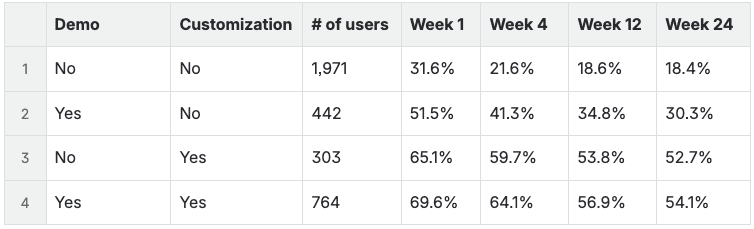
36-point retention gap between stock and customized users
No standardized workflow existed. Every dispatcher had invented their own.
Jumping between screens.
Creating a job meant navigating across work orders, estimates, scheduling, and invoices — no single place to manage any of it.
Re-entering the same data
Customer details, job site, line items — entered once per screen, every time, with no connection between records.
Paying to fix what should have been standard.
Customers who could afford it paid partners to build custom workflows. Customers who couldn't — worked around it or left.
Losing track across multiple days.
Jobs that spanned multiple visits had no parent record to connect them. Progress lived in people's heads, not the product.
Who am I designing for?
Not all field service businesses are the same
Focused on Field Service Installation & Maintenance — pool services, HVAC, windows and doors, roofing. Companies with 5–20 employees.
Primary Persona

Dispatcher Diane – Responsible for creating and updating job records. Needs speed, visibility, and minimal screen switching.

Field Crew Frank – Receives and executes job details provided by the dispatcher. Relies on accurate, up-to-date information to avoid delays and rework
Secondary Persona

Customer Chris – Interacts with the business and expects timely, professional service.
Constraints
Every design decision had two layers — what's right and what's buildable.
Legacy design system
Visual modernization was out of scope. Every decision had to work within existing components, not around them.
Legacy no-code platform
No native patterns to lean on — every interaction was either assembled from existing components or required platform investment to unlock.
Calendar component limitations.
Buggy, limited, and structurally unable to support geographic or skill-based scheduling. This one matters later: it's the reason a thing dispatchers explicitly asked for didn't ship.
The decision
One job. Everything connected.
The Job became the parent record — connecting estimates, visits, work orders, invoices and customer interactions into one thread instead of scattered records.
That single decision is what all four pain points reduce to. Jumping between screens, re-entering data, paying to fix what should have been standard, losing track across multiple days — every one is a symptom of the same root cause: nothing tying the work together. Fix the root cause once and all four close at the same time, rather than building four separate fixes.
Making the Job the parent record means a one-visit, one-technician job now travels through a structure built for multi-day, multi-crew work. I accepted that cost because the multi-day case was where the retention gap lived. Testing showed I'd underweighted how much of the real volume was simple.
Four entry points -> one system
Web to Lead
Converting an opportunity
Service request (Customer portal)
Creating a job
↓
Job
Estimate
→
Work Order
Schedule app
Estimate Visit
Work Order Visit
Customer Portal (Visits)
→
Invoice
→
Customer Portal (Payment)
Four ways in, one spine. A web lead, a converted opportunity, a customer service request and a job typed in by hand all resolve to the same Job — which then carries the estimate, the work order, the invoice and the customer portal. The convergence is the decision; everything downstream is a consequence of it.
Trade-off
Making the Job the parent record means a one-visit, one-technician job now travels through a structure built for multi-day, multi-crew work. I accepted that cost because the multi-day case was where the retention gap lived. Testing showed I'd underweighted how much of the real volume was simple.
What testing changed
Completion masked the friction
Tested with the Professional Services team, platform partners, and a CEO with a field service operating background. Completion was high — 90% on creating a job, 98% on adding visits to a work order. The problems surfaced anyway, in what people said rather than in whether they finished. A task can be completable and still be built on the wrong model; completion rate alone would have shipped it.
"It would be nice to have a single point — a primary way of doing it that is the best practice."
→ No clear entry point.
"I wanna see all the estimators to see who's available... I wanna be able to filter by discipline."
→ Scheduling was backwards. Dispatchers start with availability, not assignment.
Job management creation
0%
0%
Satisfaction completion Rate
Adding visits to Work order
0%
0%
Satisfaction completion rate
"What if they chose invoice later and then just forgot to do it?"
→ Invoice Later was a black hole with no safety net.
Where I was wrong
The CEO pushed back on something I'd deprioritized: the simple job. I had designed for the complex case first — multi-day, multi-visit, multi-crew — because that's where the retention gap was. He argued the simple one-off job was the volume case and needed a path that didn't drag the full structure behind it.
He was right, and the data confirmed it. The standalone Work Order path stayed in the product because of that conversation, not because I'd planned for it.
The pushback, in his words. Thirty seconds of an operator with field service experience taking apart the case I'd prioritized.
What Changed
Two insights. Not six fixes.
The scheduling model was backwards
Dispatchers don't think in end times, they think in availability and duration.
Duration replaced end time; end time now auto-calculates
Added a "Schedule Later" state for work that exists but isn't staffed yet
Preserved a standalone Work Order path for simple jobs

One field, not two. Duration auto-calculates end time — moving a job no longer means editing two fields and hoping they agree.

Work can exist before it's staffed. Visits wait in an unscheduled state until the dispatcher knows enough to place them.
Trade-off
The clearest request in testing was availability-first scheduling — see who's free, filter by discipline, then assign. The calendar component couldn't support it, and rebuilding it was outside what this release could carry. I shipped the half of the mental model that was buildable and left the filtering out entirely, rather than ship a version that would teach people not to trust it.
The invoicing model needed a safety net.
"Invoice Later" was, in practice, a way to forget to invoice. I removed both "Invoice Later" and "Invoice on Completion", and built an Invoice Summary that pulls every work order on the job automatically.

Before. Three ways to invoice, one of which — Invoice later — was in practice a way to never invoice at all. The option looked like flexibility and behaved like a leak.

After. Every completed work order on the job arrives already gathered, with durations and amounts, and merges into one invoice. Nothing to remember and nothing to re-key — only possible because one record already held them all.
Trade-off
This is a removal, not an addition — I took two options away from users who had them. Taking flexibility away is a harder argument to win than adding a feature, and it is only defensible because the flexibility was producing unbilled work.
What shipped
The workflow, connected end to end.
Built within the legacy V3 platform's constraints described above; the walkthrough below reflects Method's newer V4 platform.
The job at the top of this page carries an approved estimate, four work orders each with its own technician and amount, and a final invoice. The numbers close across all three — $1,200 + $2,400 + $1,600 + $800 — and nothing is re-keyed between them.

Quoted. EST-0015, approved at $6,000 in January — before any work was scheduled.

Collected. INV-0051, paid in full at $6,000 in August — after four visits across April.
Attention without filtering. Insight Blocks carry live counts — 8 new requests, 4 needing attention, 3 outstanding payments, 6 unscheduled visits — so a dispatcher opens the app already knowing where the day's problems are.

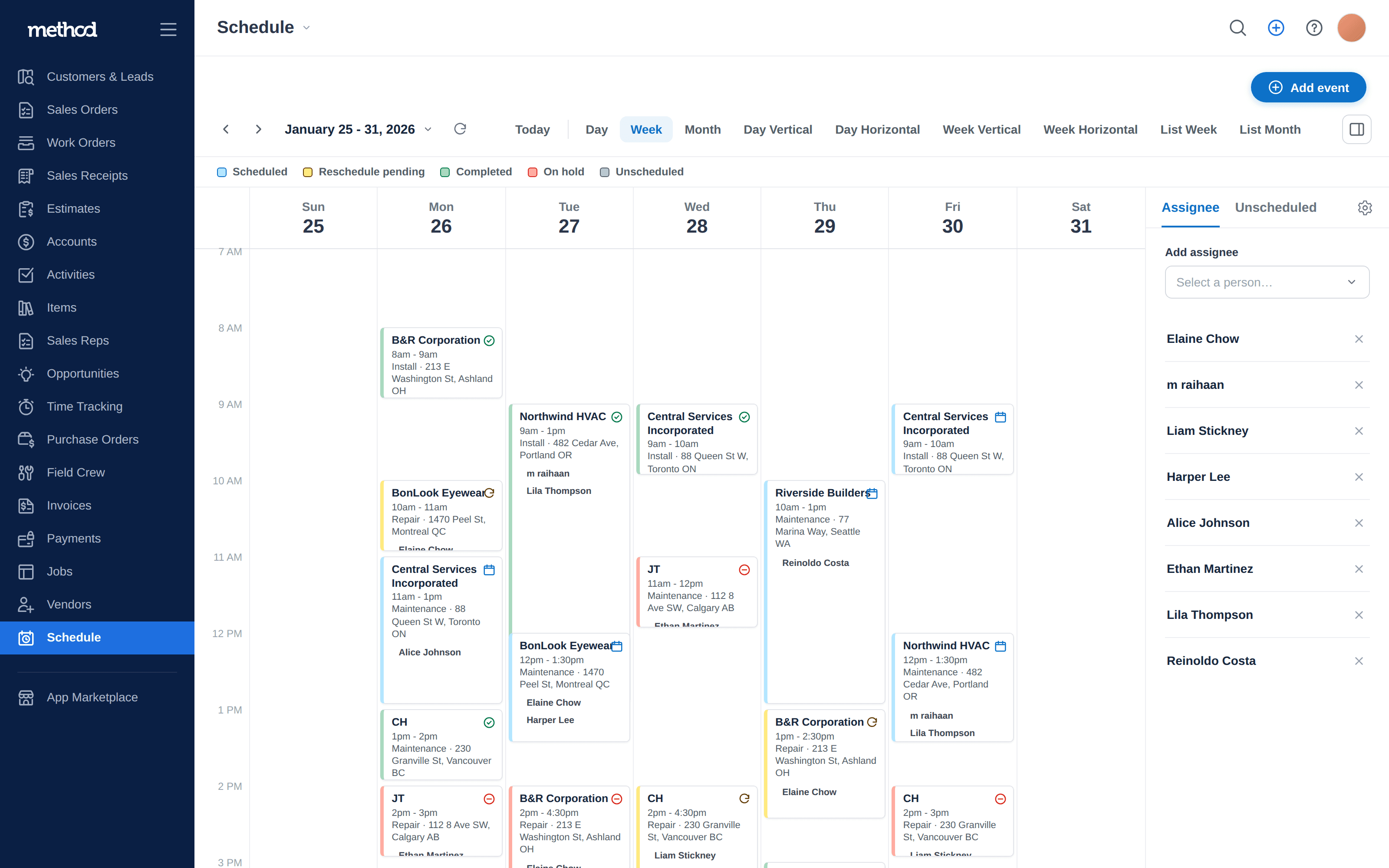
The calendar shows the team, and keeps each person findable. Multiple technicians sit on single events, the assignee rail filters to one person without hiding crew jobs, and the legend carries the two states the old model had no room for: Unscheduled and Reschedule pending.
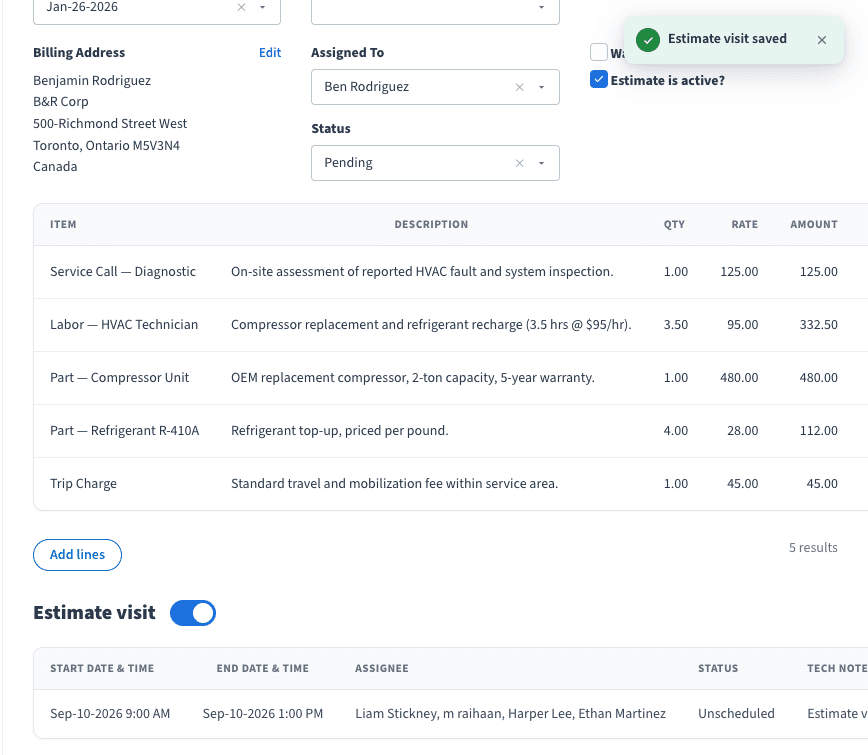
One toggle makes an estimate two things. A work order is a visit — one record, one trip. An estimate isn't, so the visit is optional: flip it on and the same record carries a $55 quote and a trip to deliver it. Note the state in the row — a crew already assigned while the visit sits Unscheduled. Staffed before it's placed, which one-technician-and-one-date could not represent at all.

And what the toggle opens. Duration rather than an end time, "Schedule later" as a first-class choice, and the crew as removable chips. The line at the bottom — "Send will notify the assignee and customer" — is Loop Through List firing once per person on that list, the platform primitive from the third case study doing its job here.

Confirmed. Arrival time, duration, and "Who's coming?" — the staffing field rendered as four faces and first names. Reschedule and Cancel are theirs to press: the phone call to the dispatcher, designed out.

Pending — and Reschedule is gone. Once a request is outstanding, both preferred times are shown back to the customer and only Cancel remains. You can't stack a second request on an unanswered one, which keeps the dispatcher from arbitrating between three versions of the same visit.
What the data showed
Users who stayed became regulars
Active accounts peaked at 74 in March, up 17.9% week over week. Retention stabilized at 64% by Week 8–10 after a steep early drop — a smile curve: decline through Week 0–3, then recovery and plateau.
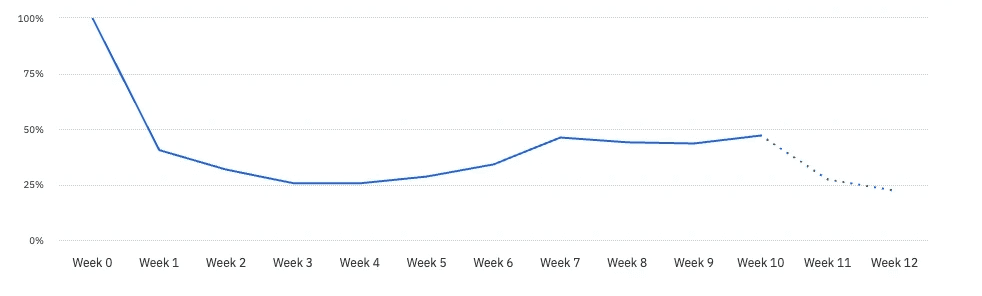
The shape is the argument. Losses concentrate in Weeks 0–3, before anyone experiences a connected workflow; everyone who reaches Week 3 stays. Dotted line marks cohorts still maturing.
"The recent changes that you’re showing are very groundbreaking and needed."
"The recent changes that you’re showing are very groundbreaking and needed."
"The merge invoices … seems complicated behind the scenes and I love it that you have that!"
"The merge invoices … seems complicated behind the scenes and I love it that you have that!"
What the curve actually says
The shape of that curve changed how I read the whole problem. Users who reached Week 3 stayed at 64%. The losses were almost entirely in Weeks 0–3 — before anyone had experienced a connected workflow at all.
Users don't churn because the workflow is wrong. They churn before they ever experience its value.
That reframes the bet. I spent this release solving a workflow problem, and the data says the next release is an activation problem — a different discipline, with different work. That's the honest read, even though it means the thing I just built isn't the thing that moves the number next.
What's Next
The next problem is already visible
Geographic and skill-set scheduling — the request I couldn't fill, once the calendar can carry it
In-app notifications for dispatcher re-entry
A mobile-first field crew experience
Progressive billing
Open question driving the next cycle: what do Week 3+ survivors do differently in their first two weeks that churned users don't?
Retrospective
What I'd do differently.
Test workflow logic before UI:
Low-fidelity interaction testing would have caught the backwards scheduling model weeks earlier than polished screens did. I tested the interface when I should have tested the model.
Design the simple and complex paths as equals from the start:
I prioritized complexity because that's where the retention gap lived, and it took a CEO with operating experience to point out that the volume case was the simple one. I'd rather have found that myself.
Own the gap between intent and output:
The legacy design system means the UI you're looking at reflects platform constraints, not design intent. That's the honest context for what shipped.
From Work Orders → Field Service Management System
From Work Orders → Field Service Management System
Problem
Method had the pieces — work orders, estimates, scheduling, invoicing — but no connected workflow. Stock users retained at 18%. Customized users at 54%.
Challenge
Build 0-to-1 field service management on a legacy no-code platform with a frozen design system and a broken calendar.
Solution
Made the Job the parent record connecting everything, added a dispatcher Schedule App and self-serve Customer Portal. WAU grew 5×.
Outcomes
↑ 64%
Retention at Week 8–10 for activated users
→ 62
Peak weekly active users in early May
↑ 5x
Weekly active users grew from ~10 at launch to a steady 45 to 55
Industry
Field Service
Company
Method CRM
Role
Lead Product Designer
Challenge
The tools existed. The workflow didn't.
A 36-point retention gap separated customized users from stock users — 54% against 18%.
The team's instinct was to add features. I pushed back. Churn reasons, support cases, feature requests and in-app chat transcripts all pointed the same way: users weren't leaving because something was missing. They were leaving because there was no standard way to use what already existed.
36-point retention gap between stock and customized users
No standardized workflow existed. Every dispatcher had invented their own.
Jumping between screens.
Creating a job meant navigating across work orders, estimates, scheduling, and invoices — no single place to manage any of it.
Re-entering the same data
Customer details, job site, line items — entered once per screen, every time, with no connection between records.
Paying to fix what should have been standard.
Customers who could afford it paid partners to build custom workflows. Customers who couldn't — worked around it or left.
Losing track across multiple days.
Jobs that spanned multiple visits had no parent record to connect them. Progress lived in people's heads, not the product.
Who am I designing for?
Not all field service businesses are the same
Focused on Field Service Installation & Maintenance — pool services, HVAC, windows and doors, roofing. Companies with 5–20 employees.
Primary Persona
Dispatcher Diane – Responsible for creating and updating job records. Needs speed, visibility, and minimal screen switching.
Field Crew Frank – Receives and executes job details provided by the dispatcher. Relies on accurate, up-to-date information to avoid delays and rework
Secondary Persona
Customer Chris – Interacts with the business and expects timely, professional service.
Constraints
Every design decision had two layers — what's right and what's buildable.
Legacy design system
Visual modernization was out of scope. Every decision had to work within existing components, not around them.
Legacy no-code platform
No native patterns to lean on — every interaction was either assembled from existing components or required platform investment to unlock.
Calendar component limitations.
Buggy, limited, and structurally unable to support geographic or skill-based scheduling. This one matters later: it's the reason a thing dispatchers explicitly asked for didn't ship.
The decision
One job. Everything connected.
The Job became the parent record — connecting estimates, visits, work orders, invoices and customer interactions into one thread instead of scattered records.
That single decision is what all four pain points reduce to. Jumping between screens, re-entering data, paying to fix what should have been standard, losing track across multiple days — every one is a symptom of the same root cause: nothing tying the work together. Fix the root cause once and all four close at the same time, rather than building four separate fixes.
Making the Job the parent record means a one-visit, one-technician job now travels through a structure built for multi-day, multi-crew work. I accepted that cost because the multi-day case was where the retention gap lived. Testing showed I'd underweighted how much of the real volume was simple.
Four entry points -> one system
Web to Lead
Converting an opportunity
Service request (Customer portal)
Creating a job
↓
Job
Estimate
→
Work Order
Schedule app
Estimate Visit
Work Order Visit
Customer Portal (Visits)
→
Invoice
→
Customer Portal (Payment)
Four ways in, one spine. A web lead, a converted opportunity, a customer service request and a job typed in by hand all resolve to the same Job — which then carries the estimate, the work order, the invoice and the customer portal. The convergence is the decision; everything downstream is a consequence of it.
Trade-off
Making the Job the parent record means a one-visit, one-technician job now travels through a structure built for multi-day, multi-crew work. I accepted that cost because the multi-day case was where the retention gap lived. Testing showed I'd underweighted how much of the real volume was simple.
What testing changed
Completion masked the friction
Tested with the Professional Services team, platform partners, and a CEO with a field service operating background. Completion was high — 90% on creating a job, 98% on adding visits to a work order. The problems surfaced anyway, in what people said rather than in whether they finished. A task can be completable and still be built on the wrong model; completion rate alone would have shipped it.
"It would be nice to have a single point — a primary way of doing it that is the best practice."
→ No clear entry point.
"I wanna see all the estimators to see who's available... I wanna be able to filter by discipline."
→ Scheduling was backwards. Dispatchers start with availability, not assignment.
Job management creation
0%
0%
Satisfaction completion Rate
Adding visits to Work order
0%
0%
Satisfaction completion rate
"What if they chose invoice later and then just forgot to do it?"
→ Invoice Later was a black hole with no safety net.
Where I was wrong
The CEO pushed back on something I'd deprioritized: the simple job. I had designed for the complex case first — multi-day, multi-visit, multi-crew — because that's where the retention gap was. He argued the simple one-off job was the volume case and needed a path that didn't drag the full structure behind it.
He was right, and the data confirmed it. The standalone Work Order path stayed in the product because of that conversation, not because I'd planned for it.
The pushback, in his words. Thirty seconds of an operator with field service experience taking apart the case I'd prioritized.
What Changed
Two insights. Not six fixes.
The scheduling model was backwards
Dispatchers don't think in end times, they think in availability and duration.
Duration replaced end time; end time now auto-calculates
Added a "Schedule Later" state for work that exists but isn't staffed yet
Preserved a standalone Work Order path for simple jobs
One field, not two. Duration auto-calculates end time — moving a job no longer means editing two fields and hoping they agree.
Work can exist before it's staffed. Visits wait in an unscheduled state until the dispatcher knows enough to place them.
Trade-off
The clearest request in testing was availability-first scheduling — see who's free, filter by discipline, then assign. The calendar component couldn't support it, and rebuilding it was outside what this release could carry. I shipped the half of the mental model that was buildable and left the filtering out entirely, rather than ship a version that would teach people not to trust it.
The invoicing model needed a safety net.
"Invoice Later" was, in practice, a way to forget to invoice. I removed both "Invoice Later" and "Invoice on Completion", and built an Invoice Summary that pulls every work order on the job automatically.
Before. Three ways to invoice, one of which — Invoice later — was in practice a way to never invoice at all. The option looked like flexibility and behaved like a leak.
After. Every completed work order on the job arrives already gathered, with durations and amounts, and merges into one invoice. Nothing to remember and nothing to re-key — only possible because one record already held them all.
Trade-off
This is a removal, not an addition — I took two options away from users who had them. Taking flexibility away is a harder argument to win than adding a feature, and it is only defensible because the flexibility was producing unbilled work.
What shipped
The workflow, connected end to end.
Built within the legacy V3 platform's constraints described above; the walkthrough below reflects Method's newer V4 platform.
The job at the top of this page carries an approved estimate, four work orders each with its own technician and amount, and a final invoice. The numbers close across all three — $1,200 + $2,400 + $1,600 + $800 — and nothing is re-keyed between them.
Quoted. EST-0015, approved at $6,000 in January — before any work was scheduled.
Collected. INV-0051, paid in full at $6,000 in August — after four visits across April.
Attention without filtering. Insight Blocks carry live counts — 8 new requests, 4 needing attention, 3 outstanding payments, 6 unscheduled visits — so a dispatcher opens the app already knowing where the day's problems are.
The calendar shows the team, and keeps each person findable. Multiple technicians sit on single events, the assignee rail filters to one person without hiding crew jobs, and the legend carries the two states the old model had no room for: Unscheduled and Reschedule pending.
One toggle makes an estimate two things. A work order is a visit — one record, one trip. An estimate isn't, so the visit is optional: flip it on and the same record carries a $55 quote and a trip to deliver it. Note the state in the row — a crew already assigned while the visit sits Unscheduled. Staffed before it's placed, which one-technician-and-one-date could not represent at all.
And what the toggle opens. Duration rather than an end time, "Schedule later" as a first-class choice, and the crew as removable chips. The line at the bottom — "Send will notify the assignee and customer" — is Loop Through List firing once per person on that list, the platform primitive from the third case study doing its job here.
Confirmed. Arrival time, duration, and "Who's coming?" — the staffing field rendered as four faces and first names. Reschedule and Cancel are theirs to press: the phone call to the dispatcher, designed out.
Pending — and Reschedule is gone. Once a request is outstanding, both preferred times are shown back to the customer and only Cancel remains. You can't stack a second request on an unanswered one, which keeps the dispatcher from arbitrating between three versions of the same visit.
What the data showed
Users who stayed became regulars
Active accounts peaked at 74 in March, up 17.9% week over week. Retention stabilized at 64% by Week 8–10 after a steep early drop — a smile curve: decline through Week 0–3, then recovery and plateau.
The shape is the argument. Losses concentrate in Weeks 0–3, before anyone experiences a connected workflow; everyone who reaches Week 3 stays. Dotted line marks cohorts still maturing.
"The recent changes that you’re showing are very groundbreaking and needed."
"The recent changes that you’re showing are very groundbreaking and needed."
"The merge invoices … seems complicated behind the scenes and I love it that you have that!"
"The merge invoices … seems complicated behind the scenes and I love it that you have that!"
What the curve actually says
The shape of that curve changed how I read the whole problem. Users who reached Week 3 stayed at 64%. The losses were almost entirely in Weeks 0–3 — before anyone had experienced a connected workflow at all.
Users don't churn because the workflow is wrong. They churn before they ever experience its value.
That reframes the bet. I spent this release solving a workflow problem, and the data says the next release is an activation problem — a different discipline, with different work. That's the honest read, even though it means the thing I just built isn't the thing that moves the number next.
What's Next
The next problem is already visible
Geographic and skill-set scheduling — the request I couldn't fill, once the calendar can carry it
In-app notifications for dispatcher re-entry
A mobile-first field crew experience
Progressive billing
Open question driving the next cycle: what do Week 3+ survivors do differently in their first two weeks that churned users don't?
Retrospective
What I'd do differently.
Test workflow logic before UI:
Low-fidelity interaction testing would have caught the backwards scheduling model weeks earlier than polished screens did. I tested the interface when I should have tested the model.
Design the simple and complex paths as equals from the start:
I prioritized complexity because that's where the retention gap lived, and it took a CEO with operating experience to point out that the volume case was the simple one. I'd rather have found that myself.
Own the gap between intent and output:
The legacy design system means the UI you're looking at reflects platform constraints, not design intent. That's the honest context for what shipped.
From Work Orders → Field Service Management System
From Work Orders → Field Service Management System
Problem
Method had the pieces — work orders, estimates, scheduling, invoicing — but no connected workflow. Stock users retained at 18%. Customized users at 54%.
Challenge
Build 0-to-1 field service management on a legacy no-code platform with a frozen design system and a broken calendar.
Solution
Made the Job the parent record connecting everything, added a dispatcher Schedule App and self-serve Customer Portal. WAU grew 5×.
Outcomes
↑ 64%
Retention at Week 8–10 for activated users
→ 62
Peak weekly active users in early May
↑ 5x
Weekly active users grew from ~10 at launch to a steady 45 to 55
Industry
Field Service
Company
Method CRM
Role
Lead Product Designer
Challenge
The tools existed. The workflow didn't.
A 36-point retention gap separated customized users from stock users — 54% against 18%.
The team's instinct was to add features. I pushed back. Churn reasons, support cases, feature requests and in-app chat transcripts all pointed the same way: users weren't leaving because something was missing. They were leaving because there was no standard way to use what already existed.
36-point retention gap between stock and customized users
No standardized workflow existed. Every dispatcher had invented their own.
Jumping between screens.
Creating a job meant navigating across work orders, estimates, scheduling, and invoices — no single place to manage any of it.
Re-entering the same data
Customer details, job site, line items — entered once per screen, every time, with no connection between records.
Paying to fix what should have been standard.
Customers who could afford it paid partners to build custom workflows. Customers who couldn't — worked around it or left.
Losing track across multiple days.
Jobs that spanned multiple visits had no parent record to connect them. Progress lived in people's heads, not the product.
Who am I designing for?
Not all field service businesses are the same
Focused on Field Service Installation & Maintenance — pool services, HVAC, windows and doors, roofing. Companies with 5–20 employees.
Primary Persona
Dispatcher Diane – Responsible for creating and updating job records. Needs speed, visibility, and minimal screen switching.
Field Crew Frank – Receives and executes job details provided by the dispatcher. Relies on accurate, up-to-date information to avoid delays and rework
Secondary Persona
Customer Chris – Interacts with the business and expects timely, professional service.
Constraints
Every design decision had two layers — what's right and what's buildable.
Legacy design system
Visual modernization was out of scope. Every decision had to work within existing components, not around them.
Legacy no-code platform
No native patterns to lean on — every interaction was either assembled from existing components or required platform investment to unlock.
Calendar component limitations.
Buggy, limited, and structurally unable to support geographic or skill-based scheduling. This one matters later: it's the reason a thing dispatchers explicitly asked for didn't ship.
The decision
One job. Everything connected.
The Job became the parent record — connecting estimates, visits, work orders, invoices and customer interactions into one thread instead of scattered records.
That single decision is what all four pain points reduce to. Jumping between screens, re-entering data, paying to fix what should have been standard, losing track across multiple days — every one is a symptom of the same root cause: nothing tying the work together. Fix the root cause once and all four close at the same time, rather than building four separate fixes.
Making the Job the parent record means a one-visit, one-technician job now travels through a structure built for multi-day, multi-crew work. I accepted that cost because the multi-day case was where the retention gap lived. Testing showed I'd underweighted how much of the real volume was simple.
Four entry points -> one system
Web to Lead
Converting an opportunity
Service request (Customer portal)
Creating a job
↓
Job
Estimate
→
Work Order
Schedule app
Estimate Visit
Work Order Visit
Customer Portal (Visits)
→
Invoice
→
Customer Portal (Payment)
Four ways in, one spine. A web lead, a converted opportunity, a customer service request and a job typed in by hand all resolve to the same Job — which then carries the estimate, the work order, the invoice and the customer portal. The convergence is the decision; everything downstream is a consequence of it.
Trade-off
Making the Job the parent record means a one-visit, one-technician job now travels through a structure built for multi-day, multi-crew work. I accepted that cost because the multi-day case was where the retention gap lived. Testing showed I'd underweighted how much of the real volume was simple.
What testing changed
Completion masked the friction
Tested with the Professional Services team, platform partners, and a CEO with a field service operating background. Completion was high — 90% on creating a job, 98% on adding visits to a work order. The problems surfaced anyway, in what people said rather than in whether they finished. A task can be completable and still be built on the wrong model; completion rate alone would have shipped it.
"It would be nice to have a single point — a primary way of doing it that is the best practice."
→ No clear entry point.
"I wanna see all the estimators to see who's available... I wanna be able to filter by discipline."
→ Scheduling was backwards. Dispatchers start with availability, not assignment.
Job management creation
0%
0%
Satisfaction completion Rate
Adding visits to Work order
0%
0%
Satisfaction completion rate
"What if they chose invoice later and then just forgot to do it?"
→ Invoice Later was a black hole with no safety net.
Where I was wrong
The CEO pushed back on something I'd deprioritized: the simple job. I had designed for the complex case first — multi-day, multi-visit, multi-crew — because that's where the retention gap was. He argued the simple one-off job was the volume case and needed a path that didn't drag the full structure behind it.
He was right, and the data confirmed it. The standalone Work Order path stayed in the product because of that conversation, not because I'd planned for it.
The pushback, in his words. Thirty seconds of an operator with field service experience taking apart the case I'd prioritized.
What Changed
Two insights. Not six fixes.
The scheduling model was backwards
Dispatchers don't think in end times, they think in availability and duration.
Duration replaced end time; end time now auto-calculates
Added a "Schedule Later" state for work that exists but isn't staffed yet
Preserved a standalone Work Order path for simple jobs
One field, not two. Duration auto-calculates end time — moving a job no longer means editing two fields and hoping they agree.
Work can exist before it's staffed. Visits wait in an unscheduled state until the dispatcher knows enough to place them.
Trade-off
The clearest request in testing was availability-first scheduling — see who's free, filter by discipline, then assign. The calendar component couldn't support it, and rebuilding it was outside what this release could carry. I shipped the half of the mental model that was buildable and left the filtering out entirely, rather than ship a version that would teach people not to trust it.
The invoicing model needed a safety net.
"Invoice Later" was, in practice, a way to forget to invoice. I removed both "Invoice Later" and "Invoice on Completion", and built an Invoice Summary that pulls every work order on the job automatically.
Before. Three ways to invoice, one of which — Invoice later — was in practice a way to never invoice at all. The option looked like flexibility and behaved like a leak.
After. Every completed work order on the job arrives already gathered, with durations and amounts, and merges into one invoice. Nothing to remember and nothing to re-key — only possible because one record already held them all.
Trade-off
This is a removal, not an addition — I took two options away from users who had them. Taking flexibility away is a harder argument to win than adding a feature, and it is only defensible because the flexibility was producing unbilled work.
What shipped
The workflow, connected end to end.
Built within the legacy V3 platform's constraints described above; the walkthrough below reflects Method's newer V4 platform.
The job at the top of this page carries an approved estimate, four work orders each with its own technician and amount, and a final invoice. The numbers close across all three — $1,200 + $2,400 + $1,600 + $800 — and nothing is re-keyed between them.
Quoted. EST-0015, approved at $6,000 in January — before any work was scheduled.
Collected. INV-0051, paid in full at $6,000 in August — after four visits across April.
Attention without filtering. Insight Blocks carry live counts — 8 new requests, 4 needing attention, 3 outstanding payments, 6 unscheduled visits — so a dispatcher opens the app already knowing where the day's problems are.
The calendar shows the team, and keeps each person findable. Multiple technicians sit on single events, the assignee rail filters to one person without hiding crew jobs, and the legend carries the two states the old model had no room for: Unscheduled and Reschedule pending.
One toggle makes an estimate two things. A work order is a visit — one record, one trip. An estimate isn't, so the visit is optional: flip it on and the same record carries a $55 quote and a trip to deliver it. Note the state in the row — a crew already assigned while the visit sits Unscheduled. Staffed before it's placed, which one-technician-and-one-date could not represent at all.
And what the toggle opens. Duration rather than an end time, "Schedule later" as a first-class choice, and the crew as removable chips. The line at the bottom — "Send will notify the assignee and customer" — is Loop Through List firing once per person on that list, the platform primitive from the third case study doing its job here.
Confirmed. Arrival time, duration, and "Who's coming?" — the staffing field rendered as four faces and first names. Reschedule and Cancel are theirs to press: the phone call to the dispatcher, designed out.
Pending — and Reschedule is gone. Once a request is outstanding, both preferred times are shown back to the customer and only Cancel remains. You can't stack a second request on an unanswered one, which keeps the dispatcher from arbitrating between three versions of the same visit.
What the data showed
Users who stayed became regulars
Active accounts peaked at 74 in March, up 17.9% week over week. Retention stabilized at 64% by Week 8–10 after a steep early drop — a smile curve: decline through Week 0–3, then recovery and plateau.
The shape is the argument. Losses concentrate in Weeks 0–3, before anyone experiences a connected workflow; everyone who reaches Week 3 stays. Dotted line marks cohorts still maturing.
"The recent changes that you’re showing are very groundbreaking and needed."
"The recent changes that you’re showing are very groundbreaking and needed."
"The merge invoices … seems complicated behind the scenes and I love it that you have that!"
"The merge invoices … seems complicated behind the scenes and I love it that you have that!"
What the curve actually says
The shape of that curve changed how I read the whole problem. Users who reached Week 3 stayed at 64%. The losses were almost entirely in Weeks 0–3 — before anyone had experienced a connected workflow at all.
Users don't churn because the workflow is wrong. They churn before they ever experience its value.
That reframes the bet. I spent this release solving a workflow problem, and the data says the next release is an activation problem — a different discipline, with different work. That's the honest read, even though it means the thing I just built isn't the thing that moves the number next.
What's Next
The next problem is already visible
Geographic and skill-set scheduling — the request I couldn't fill, once the calendar can carry it
In-app notifications for dispatcher re-entry
A mobile-first field crew experience
Progressive billing
Open question driving the next cycle: what do Week 3+ survivors do differently in their first two weeks that churned users don't?
Retrospective
What I'd do differently.
Test workflow logic before UI:
Low-fidelity interaction testing would have caught the backwards scheduling model weeks earlier than polished screens did. I tested the interface when I should have tested the model.
Design the simple and complex paths as equals from the start:
I prioritized complexity because that's where the retention gap lived, and it took a CEO with operating experience to point out that the volume case was the simple one. I'd rather have found that myself.
Own the gap between intent and output:
The legacy design system means the UI you're looking at reflects platform constraints, not design intent. That's the honest context for what shipped.