Method's first native inventory
Problem
Method's most valuable segment — $9.7M across 1,204 accounts — was churning to Katana and SOS. Reps sold stock they couldn't fulfill. Finance had no inventory flowing back to the books.
Challenge
Build inventory natively inside the CRM, with QuickBooks as the accounting source of truth, on asynchronous data that could go stale mid-decision.
Solution
One connected flow — Quote to Order to Ship to Invoice — with live availability at the moment of commitment, PO → Bill and SO → Invoice closing the loop to QuickBooks, and every action reversible. ~25% of daily active users within the first cycle.
Outcomes
~25%
of Method's daily active users work in the inventory apps
9
Average updates per order between creation and shipment
27–30%
DAU/MAU stickiness for the order apps

Industry
Manufacturing, warehousing & distribution (MWD)
Company
Method CRM
Role
Lead Product Designer
Challenge
A valuable segment was churning — and asking for inventory.
Today: MWD teams flying blind
No trustworthy stock view. Stock lived across spreadsheets, informal records and disconnected systems — no unified read on available, committed or on-hand.
Selling blind. Reps committed to customers without verifying availability. Oversells and delays followed.
No home for fulfillment. "We don't have anything today in Method that handles fulfillment." No order-needs visibility, no PO receipt confirmation, no packing slips.
Finance reconciling in the dark. QuickBooks transaction and tax mismatches were a leading churn factor, with no reliable inventory data feeding in.
$9.7M
/ 1,204 accounts
Method's fastest-growing segment
$875,672
/ 301 accounts
Lost in 2025
59
Churn quotes naming inventory by name
Who it's for
Five operators, one workflow
Order-to-cash — Estimate → Order → Ship → Invoice — runs through a cross-functional team, not a single user.
Primary Persona

Sales Manager Sam – Manages customer relationships, prepares quotes, converts approved quotes into sales orders, and creates purchase orders when inventory needs to be sourced.

Warehouse Manager Will – oversees receiving, inventory, picking, packing, and shipping to make sure orders are fulfilled accurately and on time.

Accounts Payable Alex – manages vendor bills, matches them against purchase orders and received goods, resolves discrepancies, invoices fulfilled sales orders, and manages outgoing payments.
Secondary Persona

Customer Chris – Places orders and expects accurate pricing, clear delivery timelines, and timely updates.

Vendor Victor – Supplies the products or materials needed to fulfil customer orders.
Constraints
Every decision had two layers — what's right and what's buildable.
Native inside the CRM
Inventory had to live inside the existing Sales Order and Purchase Order screens — no separate product, no second login. I validated feasibility with product and engineering before finalizing design rather than after, because on this platform a design that can't be built isn't a design, it's a proposal.
QuickBooks stays the source of truth
Method owns physical stock; QuickBooks owns the accounting record. No contradictions permitted at any transaction step.
Eventual consistency
Item quantities update asynchronously. Engineering built stale-data signals so users wouldn't act on outdated numbers — which matters most in the two moments this case study keeps returning to: importing a customer's existing data, and undoing an action after the fact.
The decision
Two questions, asked at every point in the cycle
Method is the only QuickBooks-native CRM, so inventory could live inside the selling workflow people already used instead of a second system they'd have to adopt alongside it.
Every feature in this product answers one of two questions: does this match what's physically true in the warehouse, and does this match what QuickBooks says is true. Everything below is one of those two questions, asked at a different moment.

Both questions, answered on one row. Accounting QTY on hand is QuickBooks' number; Qty In Stock, Committed, Expected and Available are Method's. The boundary the whole product turns on isn't explained in a help article — it's a column, sitting next to the number it's often confused with. And Available deliberately excludes Expected: 86 in stock, 1 committed, 2 on the way, 85 available. Stock a vendor hasn't delivered yet is not stock you can promise.
Trade-off
New orders get inventory tracking. Existing transactions stay accounting-only - Launch something smaller and clean rather than quietly breaking people's data.
That was a choice about how much risk to take on, not something we were technically stuck with. Turning tracking on for orders that were already live and being billed against was too risky: quantities update with a slight delay, and QuickBooks is the final word on the numbers, so flipping the switch retroactively could leave a customer's records wrong while they were actively being invoiced.
Bringing real data in
The trust problem starts before the product does
For every existing customer, "turning on inventory" meant bringing years of QuickBooks history into a system that had never seen it. Get that wrong on day one and nothing downstream is trustworthy — not availability, not fulfillment, not reconciliation — no matter how well any of it is designed.
The original plan was to have customers seed it themselves — one item at a time, on a form asking for SKU, sales price, purchase cost, asset account, income account, COGS account, and a quantity per location.
Testing moved us off that plan.
The product seeds from QuickBooks directly instead: "Enable inventory management" became "Enable inventory (QB sync)," and Method's copy of the truth starts as QuickBooks' copy of the truth, not a blank form someone rebuilds by hand, once per item, across an entire catalog.

Before. Eight fields, typed by hand, repeated once per SKU — the plan multiplied by however many parts a customer stocked.

After. Accounting QTY on hand becomes QTY in stock on its own — the same handoff the eight-field form used to require, done without anyone typing a number.
Every action needed an undo
Reversibility, not just workflow
A received purchase order can become a Bill.
A fulfilled sales order can become an Invoice.
Once that happens, reverting the physical action means reverting the financial one too — so it can't just delete a row and leave QuickBooks holding a document with nothing behind it.
I solved this once and reused it three times: fulfillment revert on the sell side, purchase order revert on the buy side — the same logic reversed — and stock transfers, applying the same rule across location instead of across time.

Scope before reason. Step one names exactly which shipped lines return to which location, so the reversal is precise, not blanket.

Nothing gets undone quietly. Once a shipment or receipt has already generated an invoice or bill, reverting it is moving money, not adjusting a count. Every reverted line requires a reason, and Revert stays disabled until each one has one — the guardrail isn't a warning you can dismiss, it's a gate.

same rule, third axis. A transfer reconciles a change across location the way a revert reconciles one across time — one true count, however many warehouses.
What testing changed
The real test was trust, not functionality
Onboarding sessions with experienced operators validated the enable-inventory and availability models without prompting. They also surfaced the actual risk, which wasn't usability.
Completion on partial PO receiving and partial SO shipping ran above 85%. People could do it; they didn't trust what it did — a trust problem, not a usability one, which is why the fix was visibility into QuickBooks rather than fewer clicks.
"I need to see the whole circle — that it's going back to QuickBooks on the bill and the invoice side."
"If it doesn't go back to QBO, how can you say I have inventory that's not reflected in my financials?"
Receive inventory partially (PO)
0%
0%
Satisfaction completion Rate
Shipping items partially (SO)
0%
0%
Satisfaction completion rate
"Getting my head around the 'Method only' part — for the accounting people, that's going to be your biggest challenge: explaining what you're trying to accomplish, and that you're not stepping on toes with QuickBooks."
Closing the loop
From critique to building trust
Onboarding sessions with experienced operators validated the enable-inventory and availability models without prompting. They also surfaced the actual risk, which wasn't usability.
1. PO → Bill.
Buy side. Received quantities land against the purchase order line by line, then convert to a Bill — the warehouse event becomes a finance event without re-keying.
Before: Convert bill — no convert to bill option

After: Convert bill — Visibility of items received, convert to bill

2. Sales Order → Invoice.
Sell side. Only shipped lines are offered for invoicing, at shipped quantities — nothing can be billed that didn't leave the building.
Before: Convert invoice — Old QB Desktop patterns, no inventory visibility

After: Convert invoice — Visibility of items shipped prior to invoice conversion

Trade-off
New orders get inventory tracking. Existing transactions stay accounting-only - Launch something smaller and clean rather than quietly breaking people's data.
That was a choice about how much risk to take on, not something we were technically stuck with. Turning tracking on for orders that were already live and being billed against was too risky: quantities update with a slight delay, and QuickBooks is the final word on the numbers, so flipping the switch retroactively could leave a customer's records wrong while they were actively being invoiced.
Outcomes
A trusted foundation, not a one-off feature
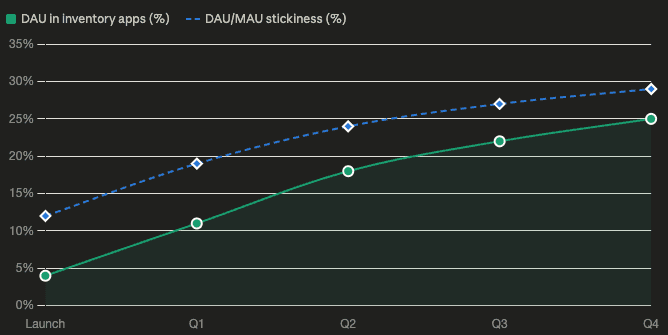
Inventory DAU approaching ~25% adoption. Stickiness climbing to ~29%, benchmarked against Method's existing order apps.
These are leading indicators, not the result. The problem this system was built against was churn — MWD accounts leaving for Katana and SOS, and $875,672 in revenue lost during 2025. Whether that stops takes a full retention cycle to read, and the product hasn't been live for one. What can be measured now is whether people adopted it: they did, daily, at a rate that tracks Method's established order apps rather than a new feature nobody found.
"You got the scope of it, you defined it all — this can absolutely work. It does work."
"This can keep somebody from having to go to a third-party like Katana or SOS."
What's Next
From foundation to depth.
The MVP set up the roadmap:
Price rules and price levels
Packing slips
Reorder points
Backorder handling
Retrospective
What I'd do differently
Validate async edge cases with users earlier:
Eventual-consistency behavior needed user eyes sooner than it got them, especially around import, where stale data does the most damage to trust.
Name the pattern sooner:
Migration, fulfillment revert, PO revert and stock transfers were one design decision solved four times, and I only saw that clearly in hindsight. Naming it early would have made the fourth one faster and more consistent than it was.
Method's first native inventory
Problem
Method's most valuable segment — $9.7M across 1,204 accounts — was churning to Katana and SOS. Reps sold stock they couldn't fulfill. Finance had no inventory flowing back to the books.
Challenge
Build inventory natively inside the CRM, with QuickBooks as the accounting source of truth, on asynchronous data that could go stale mid-decision.
Solution
One connected flow — Quote to Order to Ship to Invoice — with live availability at the moment of commitment, PO → Bill and SO → Invoice closing the loop to QuickBooks, and every action reversible. ~25% of daily active users within the first cycle.
Outcomes
~25%
of Method's daily active users work in the inventory apps
9
Average updates per order between creation and shipment
27–30%
DAU/MAU stickiness for the order apps
Industry
Manufacturing, warehousing & distribution (MWD)
Company
Method CRM
Role
Lead Product Designer
Challenge
A valuable segment was churning — and asking for inventory.
Today: MWD teams flying blind
No trustworthy stock view. Stock lived across spreadsheets, informal records and disconnected systems — no unified read on available, committed or on-hand.
Selling blind. Reps committed to customers without verifying availability. Oversells and delays followed.
No home for fulfillment. "We don't have anything today in Method that handles fulfillment." No order-needs visibility, no PO receipt confirmation, no packing slips.
Finance reconciling in the dark. QuickBooks transaction and tax mismatches were a leading churn factor, with no reliable inventory data feeding in.
$9.7M
/ 1,204 accounts
Method's fastest-growing segment
$875,672
/ 301 accounts
Lost in 2025
59
Churn quotes naming inventory by name
Who it's for
Five operators, one workflow
Order-to-cash — Estimate → Order → Ship → Invoice — runs through a cross-functional team, not a single user.
Primary Persona
Sales Manager Sam – Manages customer relationships, prepares quotes, converts approved quotes into sales orders, and creates purchase orders when inventory needs to be sourced.
Warehouse Manager Will – oversees receiving, inventory, picking, packing, and shipping to make sure orders are fulfilled accurately and on time.
Accounts Payable Alex – manages vendor bills, matches them against purchase orders and received goods, resolves discrepancies, invoices fulfilled sales orders, and manages outgoing payments.
Secondary Persona
Customer Chris – Places orders and expects accurate pricing, clear delivery timelines, and timely updates.
Vendor Victor – Supplies the products or materials needed to fulfil customer orders.
Constraints
Every decision had two layers — what's right and what's buildable.
Native inside the CRM
Inventory had to live inside the existing Sales Order and Purchase Order screens — no separate product, no second login. I validated feasibility with product and engineering before finalizing design rather than after, because on this platform a design that can't be built isn't a design, it's a proposal.
QuickBooks stays the source of truth
Method owns physical stock; QuickBooks owns the accounting record. No contradictions permitted at any transaction step.
Eventual consistency
Item quantities update asynchronously. Engineering built stale-data signals so users wouldn't act on outdated numbers — which matters most in the two moments this case study keeps returning to: importing a customer's existing data, and undoing an action after the fact.
The decision
Two questions, asked at every point in the cycle
Method is the only QuickBooks-native CRM, so inventory could live inside the selling workflow people already used instead of a second system they'd have to adopt alongside it.
Every feature in this product answers one of two questions: does this match what's physically true in the warehouse, and does this match what QuickBooks says is true. Everything below is one of those two questions, asked at a different moment.
Both questions, answered on one row. Accounting QTY on hand is QuickBooks' number; Qty In Stock, Committed, Expected and Available are Method's. The boundary the whole product turns on isn't explained in a help article — it's a column, sitting next to the number it's often confused with. And Available deliberately excludes Expected: 86 in stock, 1 committed, 2 on the way, 85 available. Stock a vendor hasn't delivered yet is not stock you can promise.
Trade-off
New orders get inventory tracking. Existing transactions stay accounting-only - Launch something smaller and clean rather than quietly breaking people's data.
That was a choice about how much risk to take on, not something we were technically stuck with. Turning tracking on for orders that were already live and being billed against was too risky: quantities update with a slight delay, and QuickBooks is the final word on the numbers, so flipping the switch retroactively could leave a customer's records wrong while they were actively being invoiced.
Bringing real data in
The trust problem starts before the product does
For every existing customer, "turning on inventory" meant bringing years of QuickBooks history into a system that had never seen it. Get that wrong on day one and nothing downstream is trustworthy — not availability, not fulfillment, not reconciliation — no matter how well any of it is designed.
The original plan was to have customers seed it themselves — one item at a time, on a form asking for SKU, sales price, purchase cost, asset account, income account, COGS account, and a quantity per location.
Testing moved us off that plan.
The product seeds from QuickBooks directly instead: "Enable inventory management" became "Enable inventory (QB sync)," and Method's copy of the truth starts as QuickBooks' copy of the truth, not a blank form someone rebuilds by hand, once per item, across an entire catalog.
Before. Eight fields, typed by hand, repeated once per SKU — the plan multiplied by however many parts a customer stocked.
After. Accounting QTY on hand becomes QTY in stock on its own — the same handoff the eight-field form used to require, done without anyone typing a number.
Every action needed an undo
Reversibility, not just workflow
A received purchase order can become a Bill.
A fulfilled sales order can become an Invoice.
Once that happens, reverting the physical action means reverting the financial one too — so it can't just delete a row and leave QuickBooks holding a document with nothing behind it.
I solved this once and reused it three times: fulfillment revert on the sell side, purchase order revert on the buy side — the same logic reversed — and stock transfers, applying the same rule across location instead of across time.
Scope before reason. Step one names exactly which shipped lines return to which location, so the reversal is precise, not blanket.
Nothing gets undone quietly. Once a shipment or receipt has already generated an invoice or bill, reverting it is moving money, not adjusting a count. Every reverted line requires a reason, and Revert stays disabled until each one has one — the guardrail isn't a warning you can dismiss, it's a gate.
same rule, third axis. A transfer reconciles a change across location the way a revert reconciles one across time — one true count, however many warehouses.
What testing changed
The real test was trust, not functionality
Onboarding sessions with experienced operators validated the enable-inventory and availability models without prompting. They also surfaced the actual risk, which wasn't usability.
Completion on partial PO receiving and partial SO shipping ran above 85%. People could do it; they didn't trust what it did — a trust problem, not a usability one, which is why the fix was visibility into QuickBooks rather than fewer clicks.
"I need to see the whole circle — that it's going back to QuickBooks on the bill and the invoice side."
"If it doesn't go back to QBO, how can you say I have inventory that's not reflected in my financials?"
Receive inventory partially (PO)
0%
0%
Satisfaction completion Rate
Shipping items partially (SO)
0%
0%
Satisfaction completion rate
"Getting my head around the 'Method only' part — for the accounting people, that's going to be your biggest challenge: explaining what you're trying to accomplish, and that you're not stepping on toes with QuickBooks."
Closing the loop
From critique to building trust
Onboarding sessions with experienced operators validated the enable-inventory and availability models without prompting. They also surfaced the actual risk, which wasn't usability.
1. PO → Bill.
Buy side. Received quantities land against the purchase order line by line, then convert to a Bill — the warehouse event becomes a finance event without re-keying.
Before: Convert bill — no convert to bill option
After: Convert bill — Visibility of items received, convert to bill
2. Sales Order → Invoice.
Sell side. Only shipped lines are offered for invoicing, at shipped quantities — nothing can be billed that didn't leave the building.
Before: Convert invoice — Old QB Desktop patterns, no inventory visibility
After: Convert invoice — Visibility of items shipped prior to invoice conversion
Trade-off
New orders get inventory tracking. Existing transactions stay accounting-only - Launch something smaller and clean rather than quietly breaking people's data.
That was a choice about how much risk to take on, not something we were technically stuck with. Turning tracking on for orders that were already live and being billed against was too risky: quantities update with a slight delay, and QuickBooks is the final word on the numbers, so flipping the switch retroactively could leave a customer's records wrong while they were actively being invoiced.
Outcomes
A trusted foundation, not a one-off feature
Inventory DAU approaching ~25% adoption. Stickiness climbing to ~29%, benchmarked against Method's existing order apps.
These are leading indicators, not the result. The problem this system was built against was churn — MWD accounts leaving for Katana and SOS, and $875,672 in revenue lost during 2025. Whether that stops takes a full retention cycle to read, and the product hasn't been live for one. What can be measured now is whether people adopted it: they did, daily, at a rate that tracks Method's established order apps rather than a new feature nobody found.
"You got the scope of it, you defined it all — this can absolutely work. It does work."
"This can keep somebody from having to go to a third-party like Katana or SOS."
What's Next
From foundation to depth.
The MVP set up the roadmap:
Price rules and price levels
Packing slips
Reorder points
Backorder handling
Retrospective
What I'd do differently
Validate async edge cases with users earlier:
Eventual-consistency behavior needed user eyes sooner than it got them, especially around import, where stale data does the most damage to trust.
Name the pattern sooner:
Migration, fulfillment revert, PO revert and stock transfers were one design decision solved four times, and I only saw that clearly in hindsight. Naming it early would have made the fourth one faster and more consistent than it was.
Method's first native inventory
Problem
Method's most valuable segment — $9.7M across 1,204 accounts — was churning to Katana and SOS. Reps sold stock they couldn't fulfill. Finance had no inventory flowing back to the books.
Challenge
Build inventory natively inside the CRM, with QuickBooks as the accounting source of truth, on asynchronous data that could go stale mid-decision.
Solution
One connected flow — Quote to Order to Ship to Invoice — with live availability at the moment of commitment, PO → Bill and SO → Invoice closing the loop to QuickBooks, and every action reversible. ~25% of daily active users within the first cycle.
Outcomes
~25%
of Method's daily active users work in the inventory apps
9
Average updates per order between creation and shipment
27–30%
DAU/MAU stickiness for the order apps
Industry
Manufacturing, warehousing & distribution (MWD)
Company
Method CRM
Role
Lead Product Designer
Challenge
A valuable segment was churning — and asking for inventory.
Today: MWD teams flying blind
No trustworthy stock view. Stock lived across spreadsheets, informal records and disconnected systems — no unified read on available, committed or on-hand.
Selling blind. Reps committed to customers without verifying availability. Oversells and delays followed.
No home for fulfillment. "We don't have anything today in Method that handles fulfillment." No order-needs visibility, no PO receipt confirmation, no packing slips.
Finance reconciling in the dark. QuickBooks transaction and tax mismatches were a leading churn factor, with no reliable inventory data feeding in.
$9.7M
/ 1,204 accounts
Method's fastest-growing segment
$875,672
/ 301 accounts
Lost in 2025
59
Churn quotes naming inventory by name
Who it's for
Five operators, one workflow
Order-to-cash — Estimate → Order → Ship → Invoice — runs through a cross-functional team, not a single user.
Primary Persona
Sales Manager Sam – Manages customer relationships, prepares quotes, converts approved quotes into sales orders, and creates purchase orders when inventory needs to be sourced.
Warehouse Manager Will – oversees receiving, inventory, picking, packing, and shipping to make sure orders are fulfilled accurately and on time.
Accounts Payable Alex – manages vendor bills, matches them against purchase orders and received goods, resolves discrepancies, invoices fulfilled sales orders, and manages outgoing payments.
Secondary Persona
Customer Chris – Places orders and expects accurate pricing, clear delivery timelines, and timely updates.
Vendor Victor – Supplies the products or materials needed to fulfil customer orders.
Constraints
Every decision had two layers — what's right and what's buildable.
Native inside the CRM
Inventory had to live inside the existing Sales Order and Purchase Order screens — no separate product, no second login. I validated feasibility with product and engineering before finalizing design rather than after, because on this platform a design that can't be built isn't a design, it's a proposal.
QuickBooks stays the source of truth
Method owns physical stock; QuickBooks owns the accounting record. No contradictions permitted at any transaction step.
Eventual consistency
Item quantities update asynchronously. Engineering built stale-data signals so users wouldn't act on outdated numbers — which matters most in the two moments this case study keeps returning to: importing a customer's existing data, and undoing an action after the fact.
The decision
Two questions, asked at every point in the cycle
Method is the only QuickBooks-native CRM, so inventory could live inside the selling workflow people already used instead of a second system they'd have to adopt alongside it.
Every feature in this product answers one of two questions: does this match what's physically true in the warehouse, and does this match what QuickBooks says is true. Everything below is one of those two questions, asked at a different moment.
Both questions, answered on one row. Accounting QTY on hand is QuickBooks' number; Qty In Stock, Committed, Expected and Available are Method's. The boundary the whole product turns on isn't explained in a help article — it's a column, sitting next to the number it's often confused with. And Available deliberately excludes Expected: 86 in stock, 1 committed, 2 on the way, 85 available. Stock a vendor hasn't delivered yet is not stock you can promise.
Trade-off
New orders get inventory tracking. Existing transactions stay accounting-only - Launch something smaller and clean rather than quietly breaking people's data.
That was a choice about how much risk to take on, not something we were technically stuck with. Turning tracking on for orders that were already live and being billed against was too risky: quantities update with a slight delay, and QuickBooks is the final word on the numbers, so flipping the switch retroactively could leave a customer's records wrong while they were actively being invoiced.
Bringing real data in
The trust problem starts before the product does
For every existing customer, "turning on inventory" meant bringing years of QuickBooks history into a system that had never seen it. Get that wrong on day one and nothing downstream is trustworthy — not availability, not fulfillment, not reconciliation — no matter how well any of it is designed.
The original plan was to have customers seed it themselves — one item at a time, on a form asking for SKU, sales price, purchase cost, asset account, income account, COGS account, and a quantity per location.
Testing moved us off that plan.
The product seeds from QuickBooks directly instead: "Enable inventory management" became "Enable inventory (QB sync)," and Method's copy of the truth starts as QuickBooks' copy of the truth, not a blank form someone rebuilds by hand, once per item, across an entire catalog.
Before. Eight fields, typed by hand, repeated once per SKU — the plan multiplied by however many parts a customer stocked.
After. Accounting QTY on hand becomes QTY in stock on its own — the same handoff the eight-field form used to require, done without anyone typing a number.
Every action needed an undo
Reversibility, not just workflow
A received purchase order can become a Bill.
A fulfilled sales order can become an Invoice.
Once that happens, reverting the physical action means reverting the financial one too — so it can't just delete a row and leave QuickBooks holding a document with nothing behind it.
I solved this once and reused it three times: fulfillment revert on the sell side, purchase order revert on the buy side — the same logic reversed — and stock transfers, applying the same rule across location instead of across time.
Scope before reason. Step one names exactly which shipped lines return to which location, so the reversal is precise, not blanket.
Nothing gets undone quietly. Once a shipment or receipt has already generated an invoice or bill, reverting it is moving money, not adjusting a count. Every reverted line requires a reason, and Revert stays disabled until each one has one — the guardrail isn't a warning you can dismiss, it's a gate.
same rule, third axis. A transfer reconciles a change across location the way a revert reconciles one across time — one true count, however many warehouses.
What testing changed
The real test was trust, not functionality
Onboarding sessions with experienced operators validated the enable-inventory and availability models without prompting. They also surfaced the actual risk, which wasn't usability.
Completion on partial PO receiving and partial SO shipping ran above 85%. People could do it; they didn't trust what it did — a trust problem, not a usability one, which is why the fix was visibility into QuickBooks rather than fewer clicks.
"I need to see the whole circle — that it's going back to QuickBooks on the bill and the invoice side."
"If it doesn't go back to QBO, how can you say I have inventory that's not reflected in my financials?"
Receive inventory partially (PO)
0%
0%
Satisfaction completion Rate
Shipping items partially (SO)
0%
0%
Satisfaction completion rate
"Getting my head around the 'Method only' part — for the accounting people, that's going to be your biggest challenge: explaining what you're trying to accomplish, and that you're not stepping on toes with QuickBooks."
Closing the loop
From critique to building trust
Onboarding sessions with experienced operators validated the enable-inventory and availability models without prompting. They also surfaced the actual risk, which wasn't usability.
1. PO → Bill.
Buy side. Received quantities land against the purchase order line by line, then convert to a Bill — the warehouse event becomes a finance event without re-keying.
Before: Convert bill — no convert to bill option
After: Convert bill — Visibility of items received, convert to bill
2. Sales Order → Invoice.
Sell side. Only shipped lines are offered for invoicing, at shipped quantities — nothing can be billed that didn't leave the building.
Before: Convert invoice — Old QB Desktop patterns, no inventory visibility
After: Convert invoice — Visibility of items shipped prior to invoice conversion
Trade-off
New orders get inventory tracking. Existing transactions stay accounting-only - Launch something smaller and clean rather than quietly breaking people's data.
That was a choice about how much risk to take on, not something we were technically stuck with. Turning tracking on for orders that were already live and being billed against was too risky: quantities update with a slight delay, and QuickBooks is the final word on the numbers, so flipping the switch retroactively could leave a customer's records wrong while they were actively being invoiced.
Outcomes
A trusted foundation, not a one-off feature
Inventory DAU approaching ~25% adoption. Stickiness climbing to ~29%, benchmarked against Method's existing order apps.
These are leading indicators, not the result. The problem this system was built against was churn — MWD accounts leaving for Katana and SOS, and $875,672 in revenue lost during 2025. Whether that stops takes a full retention cycle to read, and the product hasn't been live for one. What can be measured now is whether people adopted it: they did, daily, at a rate that tracks Method's established order apps rather than a new feature nobody found.
"You got the scope of it, you defined it all — this can absolutely work. It does work."
"This can keep somebody from having to go to a third-party like Katana or SOS."
What's Next
From foundation to depth.
The MVP set up the roadmap:
Price rules and price levels
Packing slips
Reorder points
Backorder handling
Retrospective
What I'd do differently
Validate async edge cases with users earlier:
Eventual-consistency behavior needed user eyes sooner than it got them, especially around import, where stale data does the most damage to trust.
Name the pattern sooner:
Migration, fulfillment revert, PO revert and stock transfers were one design decision solved four times, and I only saw that clearly in hindsight. Naming it early would have made the fourth one faster and more consistent than it was.